A free wedding budget spreadsheet helps you keep planned costs, supplier quotes, agreed prices and payments in one place. Use this UK template to see what you've committed, what's still outstanding and how much room remains in your plan.
Download your free wedding budget spreadsheet
Download the blank wedding budget workbook (.xlsx)
Download the fictional worked example (.xlsx)
Both files have three tabs: Start here, Budget tracker and Summary. They're free, ungated Excel workbooks, not PDFs. You don't need to sign up, provide an email address or create a cloud account to download them or use them in a compatible desktop spreadsheet. Excel itself may require a licence. Google Sheets is an optional alternative and requires your own Google account.
Save the blank file as your working copy. Keep the example separate so its fictional amounts don't accidentally become your plan. No real couple or supplier details are included. The files have no macros or external data connections.
On a phone, download the file and open it in a spreadsheet app rather than your browser's document viewer if you want to edit it. A larger screen makes the tracker easier to work with. If the link opens a preview, use your browser's download or save option.
A quick look inside
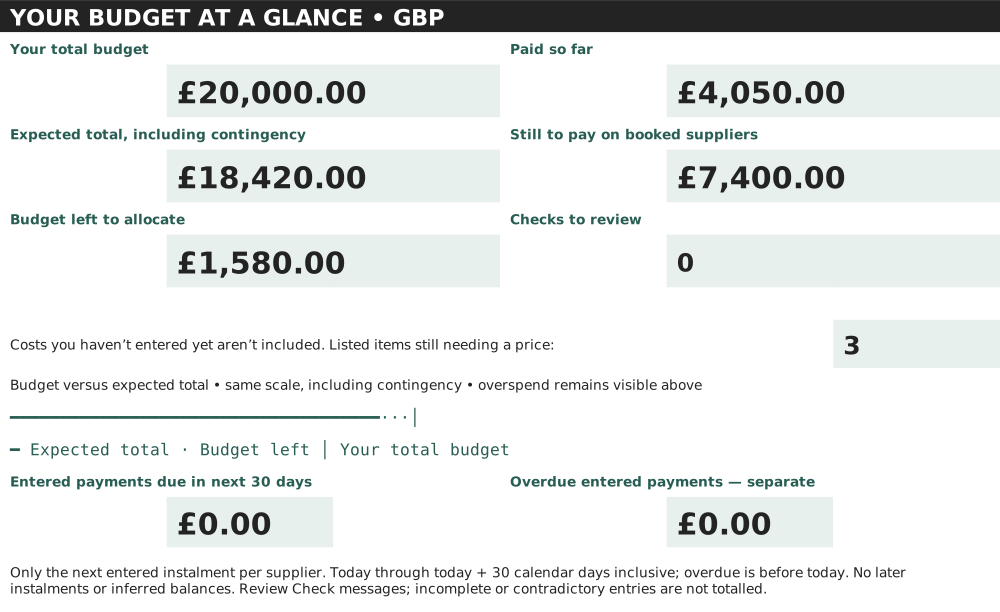
The spreadsheet answers two different questions: what are we expecting to spend, and what do we still owe suppliers? Those figures shouldn't be interchangeable. A quote isn't a booking, and money you have already paid isn't an extra cost.
Our example has £11,450 agreed with suppliers, £4,050 paid and £7,400 still outstanding. Its forecast is higher because several things aren't booked yet. The Summary keeps those unbooked costs in view rather than making the wedding look cheaper simply because you haven't signed everything.
Set a spending ceiling before filling the rows
Start with money you can safely commit, not a total borrowed from somebody else's wedding. In Start here, enter your total available budget in B3, your guest count in B4 and the amount you want to keep unallocated for contingency in B5. The blank workbook leaves these empty deliberately.
Include confirmed contributions and savings you can realistically make before payments are due. Keep everyday bills and emergency savings outside this calculation. If somebody has offered to pay for one specific item, agree the amount and timing before counting it. A hoped-for contribution is not confirmed money.
Decide what the ceiling covers. Is the honeymoon included? What about accommodation, wedding rings or outfits bought months earlier? Add a row for anything inside your plan. Record what you've excluded in your own notes so the two of you are comparing the same total.
The guest count is a reference only; changing it doesn't automatically rewrite supplier amounts. When the list changes, request revised catering and stationery costs and update those rows. Fixed costs won't necessarily move with guest numbers.
Choose a contingency you can actually leave alone. In the fictional example, £1,500 of the £20,000 available remains a reserve. It isn't added on top of the available money and it isn't owed to a supplier. The spreadsheet can't stop you spending it on chairs. It can at least make the chairs' consequences visible.
What each tracker column means
- Category: an editable grouping such as Photography, Film, Ceremony or Attire. Rename categories to match your day.
- Item / supplier: the specific cost being tracked. One row should represent one cost, not each payment towards it.
- Planned budget: your allowance before deciding who to book. Keep it as a comparison point rather than replacing it every time a quote changes.
- Quoted cost: the current option you're considering, with VAT and required charges included. A quote alone isn't a commitment.
- Agreed cost: the full confirmed booking price. Enter it when you've agreed the booking, not just because a supplier replied.
- Amount paid: the cumulative amount paid against that agreed price, including the deposit and later instalments.
- Remaining balance: a calculated agreed cost minus amount paid. It stays blank until an agreed cost is entered.
- Next payment date: the next deadline, displayed as day/month/year. Record the instalment amount and later deadlines in Notes.
- Notes: inclusions, payment dates, quote expiry, invoice references and decisions you don't want to rediscover in an inbox.
There are also two helper columns. Forecast cost chooses the agreed price if present, otherwise the quote, otherwise your planned allowance. Check flags an overpayment or a payment without an agreed total. Yellow money/date cells are inputs; green cells calculate. The category, supplier and notes text can also be edited.
Leave unknown amounts blank. Enter a genuine zero as 0, not as a blank or a dash. A booked £0 item correctly overrides an earlier allowance, while an unknown agreed price leaves the quote in the forecast. Enter numbers, not text such as “about £500”, and explain uncertainty in Notes.
Move from quotes to bookings without counting both
Use one live tracker row per item. When comparing three florists, put the option you currently expect to choose in Quoted cost and keep alternative prices in Notes or a separate comparison document. Three competing quotes should not become three forecast costs.
Check that quotes describe the same work. Ask about VAT, travel, setup, delivery, collection and anything charged per guest or per hour. Record the date and expiry of the quote. A number without its scope is difficult to compare fairly.
When you book, put the confirmed full price in Agreed cost. The forecast then uses that number instead of the quote; it doesn't add the two. If you later agree a change, update the agreed total and note the reason and date. Keep the original planned allowance so you can see the trade-off.
Photography and film stay separate categories. As indicative mid-range planning estimates consistent with our existing calculator, photography is £1,500–£2,500 and film £1,300–£2,200. These aren't researched market averages or live quotes: coverage, team size and deliverables change the price, and options can sit outside these ranges.
Record deposits and later payments once
If photography is agreed at £1,750 and you pay a £350 deposit, enter £1,750 in Agreed cost and £350 in Amount paid. Remaining balance becomes £1,400. Don't add a second row for the deposit: that would count part of the same booking twice.
If you then pay £700, change Amount paid to £1,050, not £700. Your remaining balance becomes £700. Keep a dated record of each payment in Notes and retain receipts separately. After the final £700, Amount paid is £1,750 and the balance is £0.
If you accidentally record £1,800 paid against that £1,750 booking, the tracker shows -£50 and OVERPAID. Investigate the entry or ask the supplier about the credit. The Summary shows the £50 separately rather than using it to reduce money you owe somebody else.
Update the next payment date after each instalment and clear it when nothing remains due. This is a tracker, not a payment reminder service or a bank feed. Check invoices and set calendar reminders yourself. For refunds, reduce the cumulative paid figure only when the money arrives, and explain the adjustment in Notes.
Check packages and easily missed costs
An all-inclusive venue package belongs in one row unless you deliberately split its actual price into non-overlapping parts. If evening food and corkage are included, put 0 in those rows and write “Included in venue package, row 3”. Don't add estimated catering costs on top of a package that already includes catering.
A combined photography and film package follows the same rule. Either record the full price on one clearly labelled package row and mark the other as included at £0, or split the real package total between Photography and Film. Don't record the full package price in both categories. Split payments consistently too, so the two paid figures add up to what you actually paid.
Before treating a plan as complete, check registrar fees, alterations, corkage, setup/delivery, supplier meals and overtime. Each has a starter row in the workbook. Fees and requirements vary, so confirm them with the relevant council, venue or supplier rather than taking a fictional example as a quote.
Also ask about furniture, glassware, waste removal, travel and collection for a dry-hire venue. Rename a spare row for each additional cost. If an item is included elsewhere, say where. If you decide not to buy it, use 0 with a note rather than leaving a mysterious blank.
Read the fictional worked example
The downloadable example is an invented planning exercise for 60 guests with £20,000 available. It isn't a real wedding, a recommended allocation or a promise that particular suppliers can deliver those prices.
- Original planned allowances total £17,070.
- The venue is agreed at £8,000, registrar fees at £600, photography at £1,750 and outfits at £1,100. Including the zero-price package inclusions, committed spending is £11,450.
- Venue payments of £2,000, registrar fees of £600, a photography deposit of £350 and outfits paid at £1,100 total £4,050.
- The outstanding supplier balances are venue £6,000 and photography £1,400: £7,400. The quoted film and flowers are not supplier debts.
- Using agreements first, quotes second and remaining allowances third gives a £16,920 forecast. Add the £1,500 unallocated contingency once for a planning total of £18,420.
- £20,000 less £18,420 leaves £1,580 planning headroom. Commitment-only headroom is £8,550, but that ignores the unbooked items and reserve, so it isn't a safe shopping allowance.
Try a change in a copy: increase the film quote from £1,500 to £1,700. The forecast rises by £200 and planning headroom falls to £1,380. If you then agree £1,650, that agreement replaces the quote and headroom becomes £1,430. Payments change balances, not the agreed total.
Review what remains, then extend safely
Review the workbook together after a booking or payment and at regular planning check-ins. Check new quotes, outstanding balances, upcoming dates and unknown amounts. A positive headroom figure can be misleading if several unbooked rows still have no allowance.
When you use contingency, transfer it rather than duplicating it. For example, allocating £200 from the reserve to a new £200 planned cost means reducing Start here B5 by £200. The overall planning total stays unchanged. If the reserve stays the same, the spreadsheet correctly treats the new item as additional spending.
Use the spare rows through row 202 first. For more space, copy a whole spare row to row 203 onward, including calculated columns G, J and K. Clear any copied input values, check the formulas refer to the new row, extend every Summary tracker range and extend the filter. Test with a £1 planned item, check the forecast increases by £1, then remove the test. Don't assume a pasted row is automatically included.
Save a dated backup before structural changes. Formula cells aren't locked, so avoid typing over green cells. If several people are editing offline copies, agree which file is the current one before merging changes. Two equally “final” spreadsheets are one too many.
More help with the costs behind your plan
Use the wedding budget calculator for an initial estimate and the UK wedding cost guide for the wider category overview. This workbook is the next step: tracking the real decisions, agreements and payments.
For questions to ask before booking, read the venue and catering guide, photography guide and wedding film guide. Start with your own ceiling, then use actual itemised quotes to replace the estimates.
Frequently asked questions
Can I use the workbook in Google Sheets?
Yes, it is designed for import using simple formulas. Upload the .xlsx through File > Import, set the spreadsheet locale to United Kingdom and check currency, dates and totals after conversion. Google Sheets import has not been independently verified for this download; desktop Excel and Sheets versions can display formatting differently.
Is a deposit an extra wedding cost?
No. It is part of the agreed total. Add deposits and subsequent instalments together in Amount paid on the same supplier row.
Why is a remaining balance blank?
There is no agreed price on that row yet. Enter an agreed total only when the booking is confirmed. A quote alone does not create a supplier debt.
Does contingency count as money owed?
No. It is an unallocated reserve added once to the forecast for the planning total, not to committed spending or outstanding supplier balances.
Can we change the categories?
Yes. Edit category names and use spare rows. Summary totals use amounts rather than category names. If you extend beyond row 202, follow the range-extension instructions.
Does the spreadsheet know when we pay?
No. Update Amount paid and the next payment date manually, retain receipts and check supplier statements. It has no bank connections or automatic reminders.